ViewPage
A page manages a set of views that make up a portion of your app’s user interface. It is responsible for loading and disposing of those views, for managing interactions with those views, and for coordinating responses with any appropirate data objects.
A page’s main reponsibilities include the following:
- Updating the contents of the views, usally in response to changes to the underlying data.
- Responding to user interactions with views.
- Resizing views and managing the layout of the overall interface.
Every app contains at least one custom subclass of ViewPage. More often, apps contain many custom pages. Custom pages define the overall behaviors of your app, including the app’s appearance and how it reponds to user interactions.
Lifecycle
The entire lifecycle of a page is defined by the following ViewPage methods:
class ViewPage : public ViewGroup
{
    ...
protected:
   virtual void onOpen();

   virtual void onClose();

   virtual void onResume();

   virtual void onPause();
}
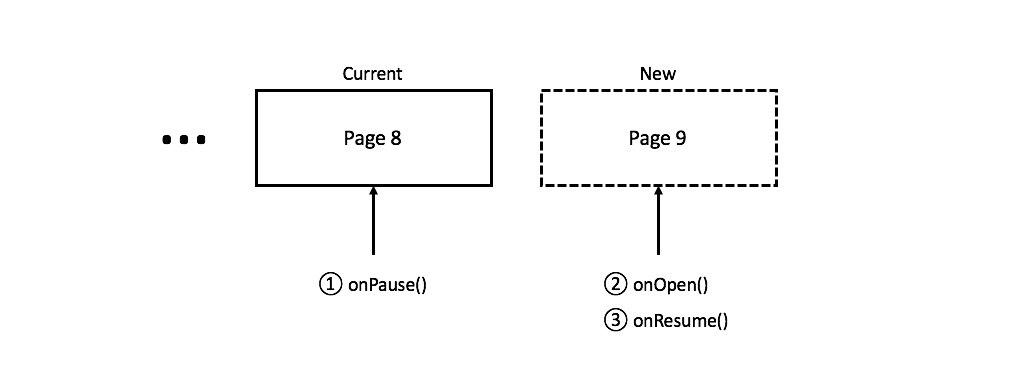
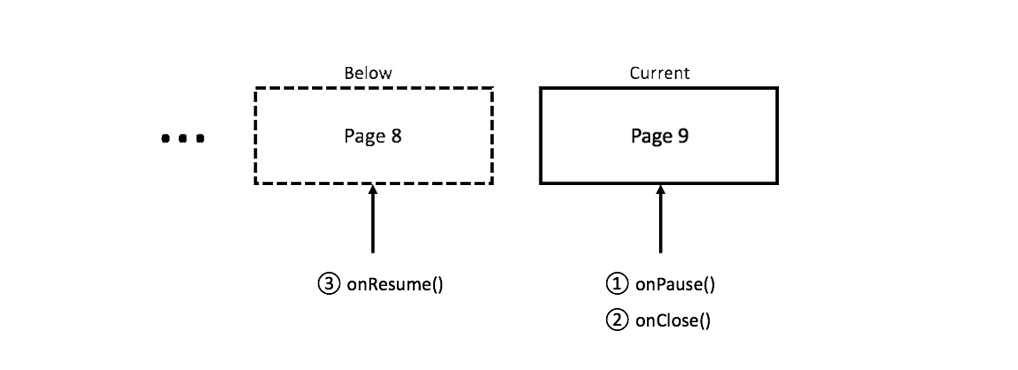
In general the movement through a page’s lifecycle looks like this:
onOpen()
Called when the page is opened and it is placed on the top of the stack.
onResume()
Called when the page is being appeared. This method is called after this page is opened, or is called when the top of this page is closed and this page is being appeared.
Pause()
Called when the page is being disappeared. This method is called before the page is actually closed, or is called when a new page is placed on the top of this page.
onClose()
Called when the page is closed and it is removed from the stack.
Opening a page:
Closing a page:
Using Pages
Creating a simple page
You can create a ViewPage from a layout resource.
<sapp version="1">
   <layout type="page"
         name="ExamplePage"
         width="fill"
         height="fill"
      <label name="label"
            width="wrap"
            height="wrap"
            text="Hello World!"
            alignCenter="true"/>
   </layout>
</sapp>
//This application name is myapp.
Ref<myapp::ui::ExamplePage;> page = new myapp::ui::ExamplePage;
page->label->setOnClick([](){
   alert("SLib.io is so great!");
});
You can also create a ViewPage programmatically.
Ref<ViewPage> page = new ViewPage;
Ref<LabelView> label = new LabelView;
label->setText("Hello World!");
label->setSizeWrapping();
label->setTextColor(Color::Red);
label->setCenterInParent();
label->setOnClick([](){
   alert("SLib.io is so great!");
});
page->addChild(label);
Every app contains at least one custom subclass of ViewPage. This is the way to set the first page of the app.
MobileApp::getApp()->setStartupPage(page);
Transitioning between pages
You can open a page using goToPage() or open().
goToPage(page);
You can customize the transition:
Transition transition;
transition.type = TransitionType::Push;
transition.direction = TransitionDirection::FromRightToLeft;
transition.duration = 1.0f;
transition.curve = AnimationCurve::Linear;
goToPage(page, transition);
You can close a page using close().
close();
You can customize the transition:
Transition transition;
transition.type = TransitionType::FadeFrontAndBack;
close(transition);